Reversing the flow: Godot Signals through an EDA lens
🌊 Understanding the usage of Godot's signals from an Event-Driven Architecture perspective.
- 📜 Intro
- ☄️ Introduction to signals
- 🆚 Signal is not quite an event
- 🏛️ What software pattern we actually use
- 👋 Let’s wrap
📜 Intro
I have a backend dev background (distributed systems, microservices, etc), but never worked with game engines. I started learning Godot less than a year ago, and for most of that time I was hesitant to use Godot signals. They felt like a scary hack that ruins architecture. I saw that some more experienced Godot creators share the same skepticism, and a couple of projects where signal usage reduced the readability.
At the same time, Godot promotes them as one of the key features; interactions with built-in classes imply signal usage and they are firmly integrated into the UI. Also a game app is a monolith, which means that if we don’t decouple our components, no one else will. And a signal looks like an event that can be sent…
Well, I started using them, combining practices from the docs and my Event-Driven Architecture experience. The resemblance to EDA is sometimes metaphorical (we will see it), but Godot signal is commonly referred to as an event, and this is an interesting perspective.
Note that I only cover the most basic signal usage (i.e the one described in Godot docs).
I usually refer to Event-Driven Architecture as EDA.
Who is this article for?
I wrote the key parts with such an audience in mind: “Understands software patterns, in particular EDA; noob at Godot”. But I cover other things as well:
- explaining Event-Driven Architecture itself
- addressing misconceptions about signals in the Godot community
- how signals are powerful
- basic software principles will be discussed along the way as well
So overall the entry barrier is low - something here should be useful regardless of skill level.
Also this article can be seen as a theoretical preparation to a series of posts where I discuss practical examples.
I am not a Godot expert. While I try to reinforce the main points, mistakes and misconceptions are possible.
☄️ Introduction to signals
We will start with a basic example.
🎵 Door SFX example
GDScript is used in code snippets. It is illustrative and concise. It shouldn’t be a problem if you are not familiar with it, but note that C# may look differently, in particular, signals are implemented via delegates.
Simple direct call
Imagine we have a Door class that represents an interactive object in game, and a DoorSFXSystem class whose responsibility is playing different door sounds. If a player opens the door, we want to play a creaking sound.
This is a basic object relationship:
1
2
3
4
class_name DoorSFXSystem

func play_sound():
	# playing sound
1
2
3
4
5
6
7
class_name Door

var sfx_system: DoorSFXSystem

func open_door():
	# some opening logic
	sfx_system.play_sound()
I am interested in code relationships, but for a full picture note that in Godot it would probably mean a Door scene, where
Door’s code is root node andDoorSFXSystem’s script is a child one.
Why direct call dependency might be undesired
We can see that the door depends on its sfx system. Why can this be an issue?
The first thing is that any change to DoorSFXSystem implementation would require the changes on the door side. The same problem arises if we want to completely replace DoorSFXSystem class with, let’s say, one generic PropSFXSystem which covers all interactive items in game.
It is common to solve this via DIP principle (adding
SFXSysteminterface, injectingDoorSFXSystemimplementation while initializing the door, etc).
Besides that, we need to deal with initialization, validation, and runtime safety measures:
- Door’s
sfx_systemvariable should be initialized (I didn’t cover that in code). It can be a part of the door’s constructor, high level manager or Godot-specific features (like@readyand@export), but either way we need to maintain this logic. - This assignment should be validated (is
sfx_systemready to use?) - During runtime door also needs to keep an eye on it (is
sfx_systemstill ready to use? maybe someone deleted it?).
Even with all this in place, new challenges arise:
- What if we want a silent door (no sfx system at all)?
- What if on door opening we also want another VFX system to create a dust effect, achievement system to count how many doors a player has opened, and many others?
- What if we want to detach and add sfx system dynamically during the
Door’s object life cycle?
How event approach solves this via decoupling
For now, I discuss the ‘event’ definition, not EDA as a whole. If you are unfamiliar with it, don’t worry: different related concepts will be gradually revealed throughout the article.
One way to address these design issues is to use Event-Driven Architecture (EDA) and the Event concept in particular (also known as Message or Notification, depending on the context):
In computing, an event is a detectable occurrence or change in state that the system is designed to monitor, such as user input, hardware interrupt, system notification, or change in data or conditions. When associated with an event handler, an event triggers a response.
This sounds scary, let’s keep only the key parts:
An event is a detectable occurrence or change in state. When associated with an event handler, an event triggers a response.
How it applies to our door?
- “Change of state” is that the door was opened (probably went from
closedstate toopened). Event represents this change. - “Detectable occurrence” usually means that this event is being sent (or “emitted”): this is how we know that it actually happened.
- “Event handler” is a function of the sfx system which plays a sound, and “associated” means that somehow we connect our event to this “handler” function.
- This operation is commonly called “subscribe”, while, as we will see, Godot uses exactly “connect”.
All together:
- Door has an event and sends it when the door is opened.
- Sfx system subscribes to this event during the initialization.
- During runtime sfx system would play the sound on receiving such an event.
This means that the door not only does not have a dependency on sfx system, but it has no idea such system exists.
How to do this in our code? We don’t want to implement some specific EDA pattern in Godot, this would require a couple of books (of questionable value). Luckily Godot has us covered.
Decoupling using Godot’s signals
How official docs describe them:
Signals are a delegation mechanism built into Godot that allows one game object to react to a change in another without them referencing one another.
This is exactly what we need!
Signals have two main functions: emit and connect.
Now Door has a signal as its attribute, and DoorSFXSystem connects to this signal. The door would emit it instead of the direct call to sfx system.
1
2
3
4
5
6
7
class_name Door

signal door_opened

func open_door():
	# some opening logic
	door_opened.emit()
1
2
3
4
5
6
7
8
9
class_name DoorSFXSystem

var door: Door

func _ready():
	door.door_opened.connect(_on_door_opened)

func _on_door_opened():
	# play sound
We did exactly the same decoupling that was described via events.
📍 Let’s pinpoint the key difference between the direct call and the signal: the dependency between Door and SFXSystem classes has been reversed: sfx system now depends on the door. I will be referring to this fact many times.
Also note that I renamed play_sound function to _on_door_opened. This is optional and does not affect the code flow, but serves two purposes:
- prefix
_means that the function is now private (by convention, of course). It is no longer a public API that theDoor(or any other class) can call. on_door_openedsemantics follows Godot naming convention:_on_node_name_signal_name. Godot calls such functions callbacks
How this addresses previously raised questions?
- Silent door: sfx system may ignore the signal, or be completely deleted from the door scene.
- Many dependent systems: each one would subscribe to door’s signal.
- Dynamic attachment of sfx system: nothing stops this (but notice that on adding we need to perform the subscribe operation)
Door’s implementation stays intact in any of these cases, it just doesn’t care.
An attentive reader might notice, that logic on sfx system side still needs an access to the door. In this post I describe signal usage with no direct dependencies at all. But for now we still have several advantages:
- Only validation on initialization is needed. During runtime dependent system shouldn’t check its door.
- Dependent system maintains only door dependency. While on the door side we were risking to maintain dozens of them (sfx, vfx, etc).
🆚 Signal is not quite an event
Term “signal” has different well-known connotations. I always refer to Godot’s signal in this article.
Currently looks like it
We saw that the signal represents a state change (“door has been opened”), how it solved the typical problem which requires events, and it solved it in an “EDA fashion”: Sfx system subscribed to door’s signal; door sent this signal; sfx system logic was triggered by it.
Besides that, the official tutorial starts with using such words:
In this lesson, we will look at signals. They are messages that nodes emit when something specific happens to them, like a button being pressed. Other nodes can connect to that signal and call a function when the event occurs.
Let’s also explore built-in signals (after all, the door example was made up). They represent a fact that happened to them, the notable change: BaseButton has pressed signal; Node has child_entered_tree; Node3D has visibility_changed(); etc.
If we use the word “event” broadly, then a signal can clearly be described as such.
Let’s try to be specific, though
If we use the word “event” as a term…
Firstly, there is no strict definition: it depends on the area, use cases, implementations. I tried to discuss the EDA essence of it, and signals fit this. That being said, there are common associations with events usage, especially with EDA, and they do not fit our signals. Also we will see that technically a signal and a usual event have very little in common.
“Event” term is being used in different areas, like hardware interruptions or OS loops. Already mentioned definition also contains this “can be implemented through various mechanisms such as callbacks, message objects, signals, or interrupts”. Here in article I ignore such connotations and refer to “event” in EDA sense, meaning it is at least a “bottled” first class type object.
This doesn’t mean that I imply only usage in distributed systems, though. Components inside one application can be very well event-driven. In fact, Godot manages user inputs via events; another example can be seen here.
Let’s prepare
Some preparations before delving into details.
Event-related terms we will borrow
Let’s start by using EDA “lenses” and borrow some terms (we’ll see later that such things should be done cautiously).
It is common to call a system that emits the event a Publisher and a system that listens to such events a Subscriber.
In our door example, Door is a publisher and SFXSystem is a subscriber.
New reference example
Let’s retell the example from the official tutorial.
Player character has a health attribute, and on receiving damage it emits a signal indicating a health change.
1
2
3
4
5
6
7
8
9
class_name Player

signal health_changed(new_amount: float)

var health: float = 10

func take_damage(amount: float):
  health -= amount
  health_changed.emit(health)
Subscriber can be a UI system which shows the player’s health on the screen.
This signal also has additional data (new_amount). We will talk about it later.
We said that both event and signal represent a state change (door went from
closedtoopen, built-in button goes fromnormaltopressed). But here we talk about some variable and not player’s state machine (i.e.player_diedsignal).This is ok, any class attribute describes the state of the object, and changing it is a notable difference in state. If other systems rely on this, having a dedicated event is perfectly fine.
You can also think about it this way: in real game character stats are important, and we probably would have a dedicated class:
This signal has the same meaning, but now its “state nature” is more illustrative and closer to our
door_opened.
Signals are not asynchronous events
Ok, let’s finally explore the differences.
Event-Driven Architecture may mean many different things, but it is usually associated with asynchronous interactions. It is one of the main selling points:
EDAs enable systems to work independently and process events asynchronously.
If we talk strictly about events, they are just objects, and implementation decides on how to operate them. Same wiki page:
The handler may run synchronously, where the execution thread is blocked until the event handler completes
But again, it is common to associate them with async “fire and forget” interaction: publisher sends an event and continues to do its own stuff.
This does not apply to Godot.
Signals are synchronous
My knowledge about this part comes from empirical tests and rather humble C++ implementation research. Misconceptions on my part are possible.
Signals are synchronous and act like a function call.
It’s a common misconception to assume otherwise, and I think there are two reasons for that.
First one we mentioned: EDA is associated with async interactions, and just by using the word “event” it becomes easier to forget that Godot’s application is a monolith and our components are not independent processes or threads.

Secondly, documentation does not emphasize it (I presume this is common knowledge that client code runs using one thread?). A funny proof is that top links that pop up in the search look like these:
- Reddit post that claims “I just learned that signals are completely asynchronous”
- Godot forum thread where confused people make wrong assumptions, decode C++ engine implementation and get to the truth in the end
So emitting a signal is a synchronous operation by default.
What does that mean for us?
Publisher halts
When our door emits its signal, the game’s execution thread stops, goes to the DoorSFXSystem to play a sound, and then returns to the Door code.
In other words, publisher stops doing its thing on emitting the signal, and waits for the subscriber to process this signal.
Obvious when you think about function calls, but words ‘emit’ and ‘signal’ make it feel weird (even if we forget about EDA).
Signals don’t make a system less traceable
Event-Driven Architecture has a well known trade off: component interactions are hard to debug. Decoupling leads to separation of “cause and effect”, and a failure can’t be traced by a linear call stack.
This is not our case. Let’s debug this:
1
2
3
4
5
6
7
8
9
10
11
12
13
14
15
extends Node

signal test_signal

func _ready():
	test_signal.connect(_on_test_signal)
	run_sync_test()

func run_sync_test():
	print("Step A: Before emit")
	test_signal.emit()
	print("Step C: After emit")

func _on_test_signal():
	print("Step B: Inside handler") # 🔴 breakpoint
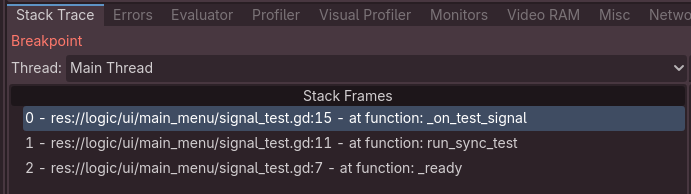 We are inside
 _on_test_signal function; We see one thread and three stack frames.
Final output:
1
2
3
Step A: Before emit
Step B: Inside handler
Step C: After emit
Emitting many signals is fine
Another common misconception is that you should not emit signals in the loop (i.e on every engine frame).
From a design perspective it’s valid, ironically, the EDA analogy shows why: objects rarely change state on every tick. But technically this should not be a problem.
There is an old GDQuest article that addresses this:
In gdscript, emitting a disconnected signal barely costs more than a function call. When connected to one node, emitting the signal plus its callback costs a little over three times slower than a direct functions call.
This article covers several topics that the official tutorial lacks, but was written for Godot 3 (
March 30, 2021). Signals were redesigned in Godot 4 (in particular, they became first-class type). To be on a safe side I sadly don’t recommend relying on this source.
Can we make it asynchronous?
We can solve the “publisher halts” problem via call_deferred feature. It “schedules” any function call until the end of the current frame. We can use this while emitting the event.
On the subscriber side, a similar API flag is available. I haven’t tested it but assume it will do the same but is “baked” into signal API to make it more handy.
Note that code will still be computed synchronously. But publisher can be described as it “fires and forgets”.
To make this truly asynchronous, we can use the threading API. I assume that implementing EDA interactions using threads would not require signals, though. Either way, async signals/events in Godot are beyond the scope of this article.
Publisher-Subscriber pitfall
I want to mention that “Publisher-Subscriber” may be described as a pattern on its own: link, link. Definitions vary, but, as we might expect by now, async communication is emphasized.
I still decided to borrow these words (Publisher/Subscriber), but assume that you started using them in your documentation or code: a new developer who is not familiar with project can be misled.
About alternatives:
- We need words to describe “the one who emitted event” and “the one who connects or listens to it”. Emitter/Connector or Sender/Listener sound either abstract or awkward in my opinion.
- Publisher/Subscriber are common: in official tutorial comments the word ‘subscribe’ is widely used (to be fair, “publish” is never used).
- In distributed systems Producer/Consumer is a common pair, but it is mostly the same.
Other differences: event routing, event payload
Other differences are natural consequences of what we’ve discussed and may seem like unnecessary nitpicking. I still need to discuss them in order to apply later in practical example.
Signals imply Event Routing
In EDA, an event is a container which holds information, and all events are treated the same (i.e being passed between functions, stored in a database, sent over the network). Typically a subscriber is exposed to any event in the system. Publishers “broadcast” their events and subscribers pick only those that matter for them.
How to distinguish events? Event type attribute is commonly used:
1
2
3
class_name Event

var event_type
I greatly simplify the examples: event usually has additional fields to describe what actually happened (like an object ID), as well as technical fields like
event_idortimestamp.
A subscriber would filter events in order to find the one that it cares about: if event.event_type == "door_opened"
This does not scale well: if you have 100 different event types, DoorSFXSystem would be triggered for each of them, while working only with one.
Common solution is called Event Routing. This concept describes “directing” events to the appropriate subscribers, i.e removing the “filtering” logic from the subscriber’s part and making it centralized.
With signals, we don’t need any of that: subscriber connects to a specific event and its logic would be triggered only by it. Signal should not carry its type, and the routing feature happens naturally. In fact, just the opposite: we cannot “broadcast” a signal to all the subscribers unless they explicitly chose to subscribe to it.
In a sense, code line door_opened.emit() is a router itself.
But where is that “event type” information located? It is just a name that we give our signal variable by convention. It is not really used anywhere (unlike the event’s attribute).
Speaking of the event that I showed,
var event_typeattribute is convenient because an event can be easily stored in database (represented as a row of table) or be sent over the network (serialized to JSON or similar structure). If events are used inside one application, we can “encode” event type into class:
This makes the event look closer to signal, while all the mentioned differences are still valid.
Features similar to event routing can be done via Godot groups. In particular, we can call all nodes in one group (“broadcasting to all subscribers”). I haven’t researched this topic.
Signals are not data but may transfer it
We saw that an event carries some information (like event_type), as this data is the event. Such data is commonly called a payload:
payload is the part of transmitted data that is the actual intended message
Usually payload is represented as a JSON-like structure:
1
2
class_name Event
var payload: Dictionary # example: {"event_type": "HealthChanged", "new_amount": 5}
In case of signals, having a signal defined might be enough (door_opened). But additional info may be still necessary, like in the health example:
1
2
3
signal health_changed(new_amount: float)

health_changed.emit(health)
An important thing is that declaration of the signal payload is optional: it is supported by some Godot UI features, but does not affect the runtime behavior. What matters is a match between emit arguments and a callback (e.g. _on_player_health_changed) interface. Just like with a direct function call.
It means that technically new_amount: float is not a part of the signal’s object. This is a key difference with an event. From the design perspective, it still can be called and treated as a payload.
Also I like how official tutorial playfully remarks:
So it’s up to you to emit the correct values.
Not only the cosmetic declaration, but the way callback interface is dependent on
emitimplies many potential problems, damaging our EDA decoupling. I explore it here.
Summary of Differences
Event
- An object; Has explicit data; It is the data;
- Being passed in order to deliver this data to someone else.
- May be routed via other systems to optimize the delivery.
- Usually is passed asynchronously: publisher and subscriber are independent systems run by different threads (or processes)
Signal
- Is also an object, but this object represents a fancy direct call;
- By convention the name of this object represents the data change;
- May pass additional data using basic procedural language ability, but this data is not part of it.
- Can be seen as a router itself.
- By default is synchronous: publisher and subscriber are the same code run by one thread;
Now what makes them similar
- Both represent an object’s state change
- Are used to categorize different changes in state
- Publisher uses them to notify other systems about the change, i.e make it “public”
- Subscribers should be configured to react to such “changes” in advance
- During runtime subscribers react to publishers “changes” accordingly
- May have additional data associated with them
Which leads to similar use cases
- Decouple the logic of publisher and subscriber
- Transfer the data between publisher and subscriber
🏛️ What software pattern we actually use
Can we pick a high-level pattern to describe what we do?
Observer
Let’s first discuss what the official tutorial tells you:
Signals are Godot’s version of the observer pattern. You can learn more about it in Game Programming Patterns
This is a good place to start, but in observer the publisher (Subject) manages its subscribers (Observers) [link_1, link_2]
Recreating this article with our door example would look roughly like this:
1
2
3
4
5
@abstract
class_name Observer

@abstract
func on_notify(event: String)
1
2
3
4
5
@abstract
class_name Subject

@abstract
func notify(event: String)
1
2
3
4
5
6
class_name SFXSystem
extends Observer

func on_notify(event: String):
	if event == "door_opened":
		# <play sound>
1
2
3
4
5
6
7
8
class_name Door
extends Subject

var _observers: Array[Observer] = []

func notify(event: String):
	for observer in _observers:
		observer.on_notify(event)
During runtime the Door subject is still dependent on its SFXSystem observer. This is a common “trait” of the pattern, for example, you need to make sure that observers are ok on the door’s side.
But the first thing we saw is how signals helped to reverse the dependency between Door and DoorSFXSystem classes. Observer design contradicts it.
I’m not saying the documentation is wrong:
- It says “a version of the observer pattern.”
- DIP is involved, so from a design perspective, the relationship is reversed
- I use the perspective of a developer using GDScript, ignoring the C++ implementation details
On the other hand, observer actually perfectly captures signal’s synchronous call nature (observer.on_notify(event) is indeed a direct call). From the wiki:
<…> multiple observers can listen to a single subject, but the coupling is typically synchronous and direct
Finding EDA pattern
Observer is one of the Gang of Four design patterns. EDA was not a formulated term back then. Let’s find something inside the EDA “toolbox”.
Can we just declare our signals to be “event-driven”? But what does that mean, exactly?
Martin Fowler has described four main patterns of EDA: 201701-event-driven. He calls the first and most common one Event Notification:
This happens when a system sends event messages to notify other systems of a change in its domain. A key element of event notification is that the source system doesn’t really care much about the response.
This article is accompanied by a GOTO talk, where he emphasizes (timestamp):
“the essence is reversal of dependencies”
Mission accomplished! Event Notification’s essence is what Observer’s design lacked. (Chekhov’s gun moment: I pinpointed this essence in introduction)
I will be referencing this pattern, but it’s also not ideal:
- Sounds abstract, can’t be treated as a coined term (e.g. like “CQRS”).
- Has this strong “async” feeling to it (to be fair, GUI events are mentioned in the talk, as well as “notify” can be used in synchronous sense, we just saw it in Observer pattern).
Also note that, of course, you can build any pattern that Martin Fowler described. But basic signal usages (official tutorial, our examples) are a synchronous implementation of the Event Notification.
Observer + Event Notification
To sum up:
- Observer pattern misses the “reversal of dependencies” point but emphasizes the synchronous nature of signals, it is also widely recognizable.
- Event Notification gets the dependency reversal just right, but sounds too abstract and may imply async interactions.
👋 Let’s wrap
Signals can be applied in an EDA fashion, and a signal can be treated as an event, even though sometimes the differences are massive - it all depends on the perspective: overall design, technical implementation, code level, data transfer ability, etc.
There is no one term that will capture all the intricacies that we deal with, but it’s okay: both similarities and discrepancies with established patterns should help us work with signals and better see how it fits into the “global world”.
It might also help to deal with documentation imperfections and better evaluate information from the web.
In order not to end on such abstract notes, let’s apply the latter right now.
Take a look at this clip. Possible critiques:
- Event Notification traits are listed, not the Observer’s.
- There is a mention of nodes, that “react independently in their own threads”. In case of the default signal usage in Godot this is not true.
Another example is this video description (edited slightly):
… we build a bridge between our character controller and the rest of the game world. Godot has powerful events routing system called signals, and it seems that collision with an enemy’s sword is exactly the case for using them. But in a big game we’ll either have zero signals or like 50, and a system whose logic is built on 50 events can be hardly debugged or scaled properly.
I would now argue that:
- because of the difference between the signal and the event, 50 signals should not be hard to debug.
- because of the similarity between the signal and the event, they should help us to scale our system.
Also signals are actually a good candidate for “bridges between the character and the rest of the game world”, as EDA events are commonly used to connect independent components (to cross between bounded contexts). I cover it in the other post.
I say this with respect. The first author created an open source game template with custom CC0 assets, including SFX and third person animations (not mixamo!), which is truly unique. The second author maintains a channel from which I learned more about game mechanics than from anywhere else. It is also accompanied by open source repositories.